App Guide
Best Poker Solver App: Free GTO Solver on iPhone and Android (2026)
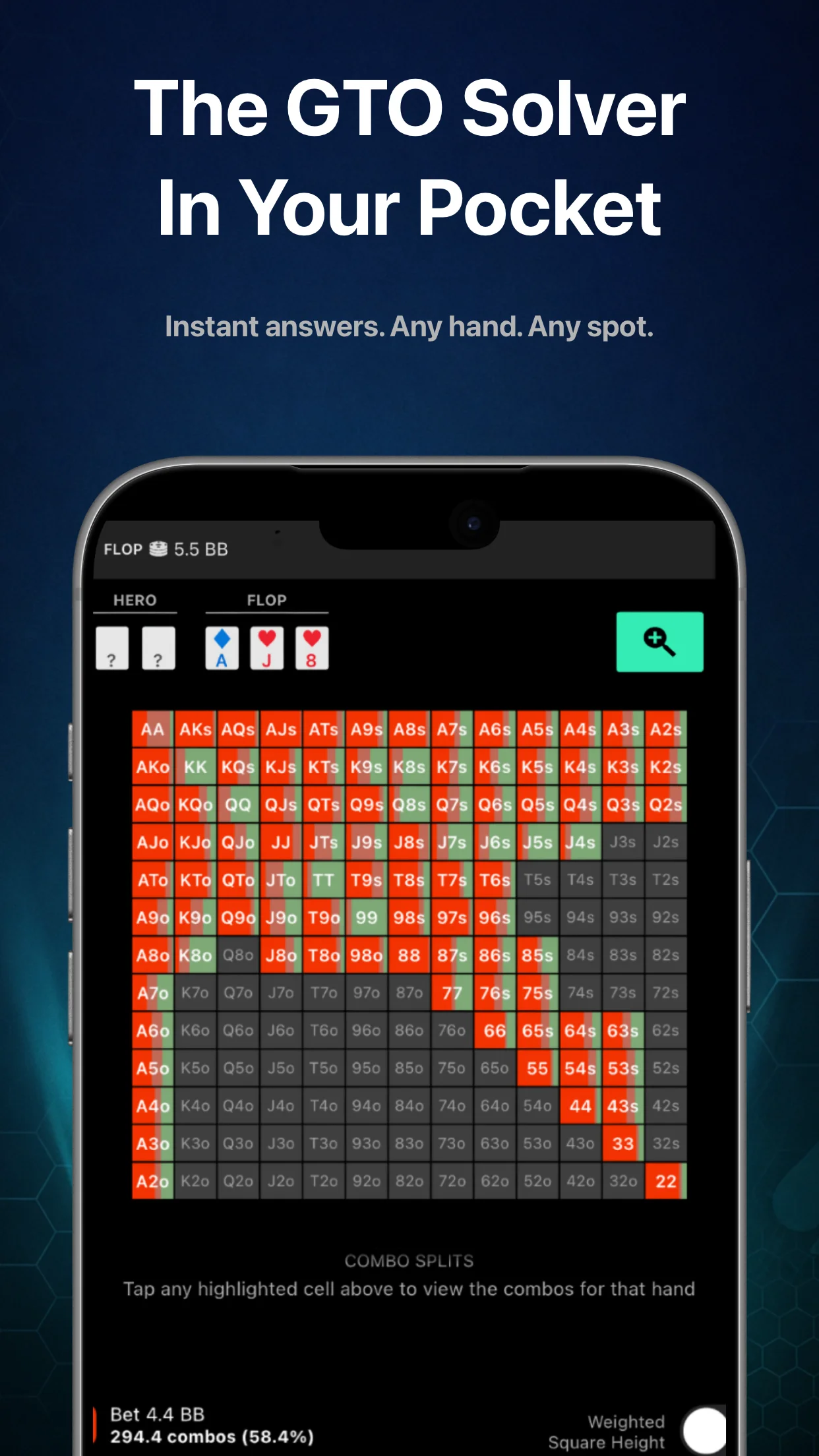
What a poker solver does
A poker solver is software that computes a game-theory-optimal (GTO) strategy for a defined poker situation. You give it the inputs: two ranges, a board, stack sizes, and the bet sizes each player is allowed to use. It then runs an iterative algorithm in which both sides keep adjusting their strategy against each other until neither can gain by changing anything. That end state is a Nash equilibrium, and the strategy it outputs is what people mean by "the GTO play".
The output is not one answer per hand. It is a set of frequencies. On a given flop the solved strategy might bet a third of the pot with part of its range, check with the rest, and split individual hands between the two. Those mixed strategies exist because an opponent who could predict your action with a hand would exploit it; mixing makes them indifferent. Reading solver output well means reading the frequencies and the sizing choices, not hunting for a single correct line.
Solvers also work inside an abstraction. Real poker allows any bet size; a solver tree allows the handful you gave it. That is why two solvers, or two trees in the same solver, can disagree slightly on the same spot. Both are correct for the game they were asked to solve. The practical takeaway is to study the shape of the strategy, which transfers across trees, rather than memorising exact percentages, which do not.
Why most "free poker solvers" are trials, and what Solver+'s free tier is
Search for a free poker solver and you find three things: time-limited trials of desktop software, web demos that solve one preset spot, and free tools that are really a signup form. None of them lets you study a range of spots for free, which is what the search is actually asking for.
Solver+ works differently because nothing is solved on demand. The spots are already solved and stored in the app, so a free tier is possible without renting server time to each user. The download is free on iPhone and Android and includes a free tier. Pro includes the full library at $29.99 a month, $299.99 a year or $399.99 as a one-time lifetime purchase; the pricing section has the current detail. There is no trial clock running against you on the free tier.
One App Store reviewer, on the free version: "The amount of high-quality features you get from just the free version is incredible. The interface is easy to use and I highly recommend this for anyone who wants quick or in-depth hand analysis." The app sits at 4.7 stars across 1,161 ratings on iOS. The Solver+ product page has the full feature list.
A pre-solved library vs running a desktop solver
A desktop solver is a calculator. You build the tree, set the ranges and sizes, start the solve, and wait: seconds for a simple flop with a small tree, much longer for a full multi-street tree with several sizes per node, on a machine with enough memory to hold it. Then you read the result for that one spot. Want the same board from a different position? Build and solve again.
Solver+ is a library. The common spots have already been solved, so the work you do is browsing and reading, not configuring and waiting. The library covers over 100 million spots across the common preflop action sequences, board textures and bet-sizing configurations, each solved to an exploitability of under 0.5% of the pot. Open the app, pick the positions, pick the preflop action, pick the flop, and the strategy is there.
What you give up is custom inputs. If you want to solve an unusual stack depth with a bet size nobody uses and your own hand-picked ranges, that is a desktop job. For the way most players actually study, which is looking at how the standard spots play and trying to internalise the pattern, the library approach removes every bottleneck: no hardware, no solve times, no tree-building mistakes, and it is in your pocket when the question comes up.
The two are not rivals so much as different tools. Plenty of players run a desktop solver for custom work and keep Solver+ for everything else. The mobile vs desktop solver post goes further into when each one earns its place.
How to study with Solver+: a walkthrough
The app rewards a method. Browsing random spots feels productive and teaches little. Here is a session that works, kept at the level of principle because the numbers depend on the exact spot you load.
- Pick one spot type, not one hand. Choose a preflop action (for example a single-raised pot, button open, big blind call) and one board family: a dry ace-high flop, a low connected flop, a paired board. You are going to study how the whole range plays this texture, so the lesson transfers to every board in the family.
- Read the range-level action first. Before you look at any single hand, note how the whole range splits between checking and betting, and which sizes appear. That split is the headline. On some textures one size carries most of the range; on others the strategy is far more mixed. The pattern is the lesson.
- Compare the sizings. Where more than one size shows up, look at which hand classes gravitate to each. Solver+ shows the strategy as bet sizing and frequency trees, so you can see whether the bigger size is doing something different from the smaller one, or whether the two overlap heavily. If they overlap, the choice between them matters less than the decision to bet at all.
- Note the frequency, not the EV. At equilibrium every action a hand mixes between has the same expected value, so comparing the EV numbers of two mixed actions tells you nothing. What transfers to the table is how often each action is chosen. If a hand class bets most of the time, that is a bet in practice. If it is split close to evenly, either play is fine and your choice should depend on the opponent.
- Change one variable and look again. Use the spot comparison tools to put the same board next to a different position, or the same position on a neighbouring texture. The thing that changed between the two displays is usually the concept you were missing.
- Bookmark and write the sentence. Solver+ lets you bookmark and annotate spots. Write one line in plain language that captures the pattern, something like "on this texture the aggressor bets small with almost everything". A list of your own one-sentence rules, built from spots you actually looked at, is worth more than any chart.
Twenty minutes of this, three times a week, covers more spots in a month than most desktop setups do in a year. The how to use a poker solver study method expands on the reading step, and the five common solver study mistakes post lists the habits to avoid.
Solver+ or Postflop+: look-up vs drilling
ThinkGTO makes two postflop apps, and the question of which to install comes up constantly. The split is simple.
Solver+ is for looking things up. You have a spot in mind and you want the solved strategy for it, with the sizing and frequency breakdown, the ability to compare it to a neighbouring spot, and a bookmark so you can find it again. It is reference material, and the right tool when you are reviewing hands from a session or trying to understand a texture.
Postflop+ is for practising. It deals you spots against a GTO bot across flop, turn and river; you make the decision, then you see the GTO answer. It covers all 1,755 strategically distinct flops with full turn and river runouts, lets you filter by position, board texture, SPR and bet sizing, and tracks your progress with an ELO rating that starts at 1200 and moves with the difficulty and accuracy of your decisions. It is the right tool when you already understand a concept and need it to become automatic.
Most players who improve use both: Solver+ to understand a spot, Postflop+ to drill it until the hesitation goes away. If you can only pick one and you have never studied with a solver before, start with Solver+ and read before you drill. If you have done plenty of reading and your problem is execution, start with Postflop+. The best GTO trainer app guide covers the trainer side in depth.
How accurate is a mobile solver?
Accuracy in a solver is measured by exploitability: how much a perfect opponent could gain, per hand, against the strategy. A solve with low exploitability is one nobody can beat by much. Solver+ solutions are solved to an exploitability of under 0.5% of the pot, which is the kind of threshold desktop users set for a converged solve. The phone is not doing the solving; it is displaying solutions that were computed in advance on proper hardware. The device in your hand has no bearing on the quality of the answer.
The honest caveat applies to every solver, mobile or desktop: the solution is exact for the tree it was given. Different allowed bet sizes or slightly different preflop ranges produce slightly different outputs. That is a reason to study patterns, not a reason to distrust the data. For a plain-language definition, see the glossary entry for solver, and for the theory behind the output, the GTO entry.
Who should use a poker solver app
If you play tournaments or cash games above the micros and you have never looked at solver output, Solver+ is the cheapest way to see what equilibrium strategy actually looks like, and the free tier means the first look costs nothing. If you already run a desktop solver, the app is the reference you reach for away from the desk and the quick second opinion on a spot you half remember. If you are brand new to the game, start with the beginner's guide to GTO poker first; solver output assumes you know what a range is.
Preflop is a separate question. Solver+ is a postflop library, indexed by the preflop action that led to the flop. For preflop ranges across cash, MTT, ICM, PKO and multiway spots, the app is GTO Ranges+, and for push/fold specifically, Preflop+. Both are free downloads with a free tier, like Solver+. The which GTO poker app do you need page lays all six out side by side.
Frequently asked
Is there a free poker solver?
Yes. Solver+ is a free download on iPhone and Android and includes a free tier, so you can browse pre-solved GTO spots without paying. Pro includes the full library at $29.99 a month, $299.99 a year or $399.99 lifetime. There is no time-limited trial; the free tier does not expire.
What is the best poker solver app for iPhone?
Solver+. It is rated 4.7 stars across 1,161 ratings on the App Store and carries over 100 million pre-solved spots, browsable by position, preflop action and board texture. The same app is on Google Play for Android.
GTO solver online vs a solver app: which is better?
An online or browser solver computes on a server when you ask, so free access is usually limited to a demo spot or a trial period. A solver app with a pre-solved library gives you the solved strategy instantly and does not depend on a queue or a subscription to a server. A desktop solver is still the tool for custom trees with unusual sizes or hand-picked ranges.
How accurate is a mobile poker solver?
Solver+ solutions are solved to an exploitability of under 0.5% of the pot, the same kind of convergence threshold desktop users set. The phone only displays the solution; the solving was done in advance. Like every solver, the output is exact for the bet sizes and ranges in its tree, so study the pattern rather than memorising exact percentages.
Can I use a poker solver app while playing?
No. Solver+ is designed as a study tool for use between sessions, to review spots and build intuition. Real-time assistance is prohibited by online poker sites, and consulting a device during a live hand is not allowed in card rooms. Study away from the table, then play from memory.
Does Solver+ work offline?
The spots are pre-solved, so opening one does not run a solve on a server. For the current download and offline behaviour of the library, check the app's store listing; this page only lists features the Solver+ product page confirms.
Does Solver+ cover preflop ranges?
Solver+ is a postflop library, indexed by the preflop action that led to the flop. For preflop ranges across cash, MTT, ICM, PKO and multiway spots use GTO Ranges+, and for short-stack push/fold use Preflop+. Both are free downloads with a free tier.
Do I still need a desktop solver?
Only if you need custom inputs: your own ranges, unusual stack depths or bet sizes the pre-solved library does not include. For studying how the standard spots play, which is most of what improves a win rate, a pre-solved library on your phone is faster and covers more ground.
Get the free poker solver app
Over 100 million pre-solved GTO spots on your phone. Free download with a free tier, on iPhone and Android.
Download Solver+ FreePro from $29.99/month, $299.99/year or $399.99 lifetime. See pricing.
Get the free Solver Vault
Subscribe and get the Solver Vault instantly: 60+ pages of solver-backed Deep Dive breakdowns, yours to keep. Weekly GTO insights follow. Free forever.
No spam, ever. Unsubscribe anytime.
You're in. Here's your pack.
Weekly GTO tips are on the way too. Unsubscribe anytime.
Download your packKeep reading
Last updated Oct 24, 2026.